In the bustling digital landscape where ideas are currency and collaboration is the engine of progress, the tools we use to think, write, and build together matter more than ever. We’ve all been there: drowning in a sea of disconnected Google Docs, emailing document versions back and forth until the file name looks like, links or struggling to format code snippets in a platform that was never designed for them. For developers, writers, engineers, and knowledge workers of all kinds, this friction isn’t just an annoyance; it’s a genuine barrier to innovation and clarity. Enter the world of collaborative markdown editors, a category that promises to streamline this chaos. And at the forefront of this revolution stands a particularly powerful and elegant tool: HackMD.
HackMD is more than just another note-taking app. It is a real-time, collaborative platform built from the ground up to embrace the simplicity and power of Markdown. Imagine a Google Docs-like experience, but one that feels native to the way programmers and technical thinkers naturally write. It’s a space where you can seamlessly blend formatted text, tables, and images with executable code blocks, mathematical equations, and dynamic multimedia, all while multiple team members edit and comment simultaneously. This article is your deep dive into everything HackMD. We will explore its origins, unpack its extensive feature set, guide you through its practical applications, and show you why it has become an indispensable tool for open-source communities, agile teams, and educational institutions around the globe. Whether you’re a seasoned developer looking to improve your team’s documentation or a student searching for a better way to collaborate on projects, understanding what HackMD brings to the table is the first step toward a more fluid and productive workflow.

What Exactly is HackMD?
To truly grasp the value of HackMD, it’s helpful to first understand the core technology it’s built upon: Markdown. Markdown is a lightweight markup language created by John Gruber in 2004 with a key design philosophy—it should be easy to read, easy to write, and, most importantly, convertible to structurally valid HTML. Instead of fiddling with toolbar buttons for bold or italics, you simply wrap words in asterisks or underscores. Instead of struggling with clunky table editors, you draw tables with pipes and dashes. This plain text format is not only incredibly fast to work with but also future-proof, portable, and perfectly suited for version control systems like Git. For anyone who has ever written a README file, a blog post, or any form of technical documentation, Markdown is often the lingua franca.
HackMD takes this foundational language and supercharges it with the power of real-time collaboration. At its heart, HackMD is a service that provides shared notebooks, or “pads,” where multiple users can write and edit in Markdown at the same time, seeing each other’s cursors and changes instantaneously. Think of it as a collaborative integrated development environment (IDE) for your notes and documentation. It eliminates the friction of “who has the latest version?” and creates a single source of truth for your team’s knowledge. The platform is accessible via any modern web browser, requiring no complex installation, yet it offers a depth of features that can satisfy the most demanding power users. It’s this combination of simplicity at the entry point and powerful capabilities under the hood that defines the HackMD experience.
The platform’s very name offers a clue to its ethos. “Hack” here is used in its original, positive sense—the clever and exploratory process of building and understanding systems. “MD” stands for Markdown. Therefore, HackMD is quite literally a tool for hacking with Markdown. It’s designed for those who want to deconstruct the traditional document-editing process and rebuild it in a more efficient, programmable, and interconnected way. It’s not just about taking notes; it’s about creating living documents that can integrate with your entire development and communication stack, from GitHub to Slack and beyond.
The Core Features That Make HackMD Shine
The appeal of HackMD isn’t based on a single gimmick but on a well-integrated suite of features that work in harmony to create a superior writing and collaboration environment. When you begin to explore its capabilities, you quickly realize that this is a tool designed with a profound understanding of its users’ needs. From the moment you create a new pad, the platform empowers you to work smarter, not harder. Let’s break down the core functionalities that form the backbone of the HackMD platform and examine how each one contributes to a more streamlined workflow for individuals and teams alike.
The most immediate and impactful feature is its real-time collaboration. When you share a HackMD pad with teammates, everyone can edit the same document simultaneously. You see avatars and cursors moving in real-time, with changes reflected instantly for all participants. This transforms documentation from a solitary, sequential task into a dynamic, parallel activity. A project manager can be writing the meeting agenda at the top of the document while a developer is pasting in a code snippet for discussion in the middle, and a designer is adding feedback via comments on an embedded image—all at the same time. This concurrency drastically reduces the time spent on creating and finalizing shared materials, making meetings more productive and project alignment faster and more transparent.
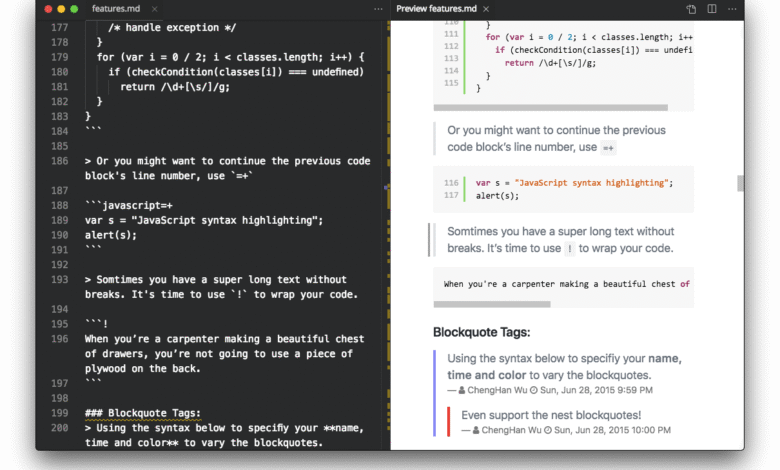
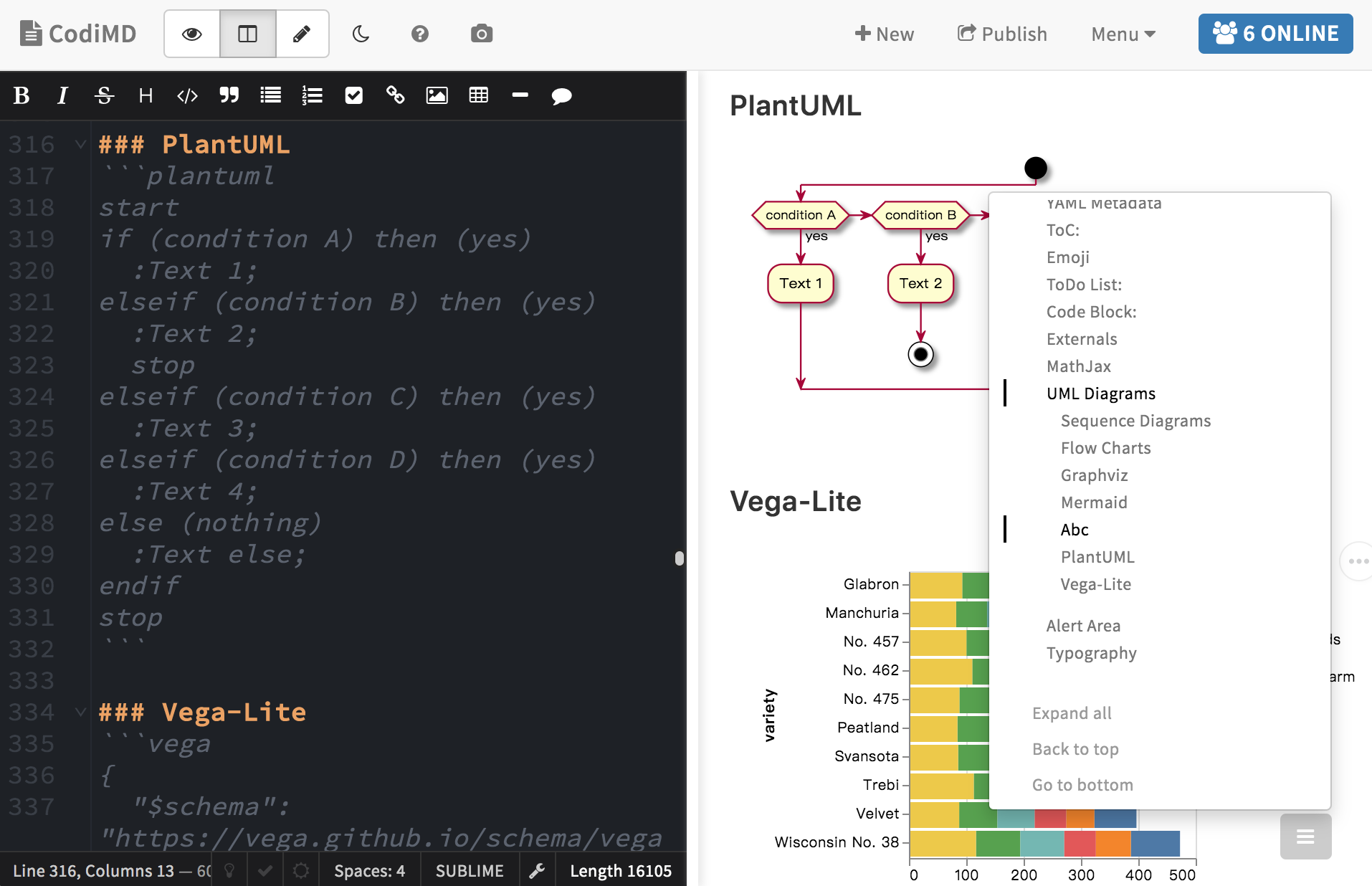
Beyond basic collaboration, HackMD boasts a rich and versatile Markdown rendering engine. It supports all the standard Markdown syntax you’d expect, but it also extends far beyond the basics with support for tables, task lists, and sophisticated code block highlighting. You can specify the programming language for a code block, and HackMD will automatically apply the correct syntax coloring, making code incredibly readable within your notes. Furthermore, it supports mathematical typesetting using either KaTeX or MathJax, allowing you to write beautiful, complex equations directly within your document. This makes HackMD an exceptional tool for technical fields, academia, and any domain where precise notation is required.
Diving Deeper into Advanced Functionality
As you move from a casual user to a power user, you’ll discover features that truly set HackMD apart. One such feature is its support for YAML metadata. At the top of a document, you can define a section enclosed by triple dashes (—) to include metadata like the document title, tags, authorship, and publication status. This might seem like a small detail, but it’s a game-changer for document management and publishing workflows. It allows HackMD to behave more like a static site generator, where you can control permalinks, SEO tags, and other publishing parameters directly within the document itself.
Another powerful capability is the inclusion of customizable modes. HackMD offers a unique editor and viewer combination. You can work in a seamless editing mode where you write Markdown and see a live-rendered preview side-by-side. Alternatively, you can switch to a pure viewing mode for presenting, or a pure editing mode for distraction-free writing. This flexibility ensures that the tool adapts to your current task, whether you’re deep in a creative flow or sharing your screen during a presentation. The platform’s attention to these kinds of user experience details demonstrates a mature and thoughtful design philosophy.
The following table provides a clear overview of these core features and their direct benefits:
| Feature | Description | Primary Benefit |
| Real-time Collaboration | Multiple users edit the same document simultaneously with live cursor tracking. | Eliminates version confusion and accelerates collaborative writing. |
| Extended Markdown Support | Goes beyond basic syntax to include tables, task lists, and code blocks with syntax highlighting. | Creates rich, well-structured, and highly readable technical documents. |
| Mathematical Typesetting | Renders mathematical equations using KaTeX/MathJax syntax. | Essential for academic, scientific, and engineering documentation. |
| YAML Front Matter | Allows embedding metadata (title, tags, etc.) at the top of a document. | Enables advanced publishing control and integration with static sites. |
| Multiple Viewing Modes | Toggle between edit, preview, and presentation modes. | Adapts the interface to suit writing, reviewing, or presenting needs. |
| Version Control & History | Automatically saves a full history of all changes with the ability to revert. | Provides a safety net and a clear audit trail of document evolution. |
Getting Started with HackMD: A Practical Guide
The beauty of HackMD lies in its gentle learning curve. You don’t need to be a Markdown guru to start benefiting from it immediately. The platform is designed to be intuitive for beginners while still offering deep functionality for experts. If you’ve ever used a keyboard shortcut for bold or italics in another application, you already understand the basic concept. The best way to get a feel for HackMD is to dive in and start creating. In this section, we’ll walk through the initial steps of setting up your environment, creating your first pad, and mastering the fundamental syntax that will form the basis of all your future documents.
Your journey begins at the HackMD website. You can instantly start creating a new note, or “pad,” without even signing up for an account. However, to save your work, access your history, and enjoy team features, you’ll want to create a free account. Registration is straightforward, supporting multiple methods including Google, GitHub, Facebook, and Twitter, making it easy to get started in seconds. Once you’re in, the clean, minimalist interface presents you with a dashboard where all your notes are organized. Clicking “New Note” opens a fresh, blank canvas—your new pad—ready for your ideas. The interface is divided, by default, into two panes: the left is your editing space where you write raw Markdown, and the right is the live preview that shows you exactly how your document will look.
Now, let’s put pen to paper, or rather, fingers to keyboard. Start with the basics. To create a heading, you use the hash symbol (#). A single # for a top-level H1 heading, ## for an H2, and so on. For bold text, you wrap the word in double asterisks (**bold**), and for italics, single asterisks (*italics*). Creating a list is as simple as starting a line with a dash (-) for a bulleted list or a number followed by a period (1.) for an ordered list. The live preview on the right will instantly transform your plain text into formatted content. This immediate feedback loop is incredibly effective for learning Markdown quickly. You can see the cause and effect in real-time, which solidifies your understanding far better than any memorization technique.
Mastering the Essential Syntax and Collaboration
As you grow more comfortable, you can incorporate more advanced elements. Code blocks, for instance, are vital. You create them by enclosing your code with three backticks ( “` ). To add syntax highlighting, you simply specify the language immediately after the first set of backticks, like so: “`javascript. This tells HackMD to apply JavaScript coloring rules, making the code snippet clear and professional. Similarly, you can create tables using pipes and dashes. While it might seem tedious to type at first, the structure is perfectly clear and easily editable. The key is to not be intimidated; you can always use the helpful toolbar at the top of the editor, which provides buttons for the most common formatting options, inserting a code block, or adding a table.
The true magic, however, happens when you invite others to collaborate. Click the “Share” button at the top right of your pad, and you’re presented with a range of options. You can generate a simple link to share, granting either read-only or full edit access. You can also invite specific teammates by their email if you’re on a team plan. Once your collaborators join, you’ll see their avatars appear in the top right corner. As they type, their cursors and changes will be visible to you in real-time. HackMD also includes a built-in chat feature, allowing for quick, contextual conversations about the document without needing to switch to another app like Slack or Teams. This seamless integration of communication and creation is a cornerstone of its effectiveness.
“HackMD transformed our team meetings. Instead of one person frantically trying to type notes, we all contribute to the same agenda and minutes document in real-time. It’s like Google Docs, but built for how our engineering team actually thinks and writes.” — A DevOps Team Lead
HackMD for Teams and Enterprises
While HackMD is a fantastic tool for individual power users, its real transformative potential is unlocked at the team and organizational level. In today’s distributed work environments, where teams are often spread across different time zones, having a centralized, asynchronous hub for knowledge is not a luxury but a necessity. HackMD is engineered to meet this challenge head-on, providing a structured yet flexible environment that scales from a small startup to a large enterprise. It moves team documentation from a static, archived state to a dynamic, living resource that actively participates in the daily workflow.
One of the most powerful team-oriented features is the concept of “Team Workspaces.” Instead of having notes scattered across individual accounts, a Team Workspace provides a shared, collaborative space where all members can create, access, and manage documents collectively. This is the digital equivalent of a shared team drive or a common notebook. It ensures that valuable knowledge is owned by the team, not siloed within an individual’s account. When someone leaves the team or the organization, the knowledge remains intact and accessible. Permissions can be finely tuned, allowing team owners to manage who can view, edit, or administer the workspace, providing both openness and security as needed.
The platform also excels in facilitating more effective and accountable meetings. Many teams use a HackMD pad as a shared, collaborative meeting agenda. Before the meeting, everyone can asynchronously add topics they want to discuss. During the meeting, the same document serves as the live notepad, with different participants responsible for taking notes on different agenda items. Decisions and action items are recorded directly in the document, often using task lists (- [ ]). By the end of the meeting, the notes are already complete, formatted, and distributed—no post-meeting transcription or cleanup is required. This practice creates a single, authoritative record of what was discussed and decided, dramatically improving organizational clarity and follow-through.
Security, Control, and Single Sign-On
For larger organizations and enterprises, security and administrative control are paramount. HackMD’s Enterprise plan addresses these needs with robust features designed for corporate environments. This includes Single Sign-On (SSO) integration, which allows employees to log in using the company’s existing identity provider (like Okta or Azure AD), simplifying user management and enhancing security. Administrators gain access to a management console where they can oversee all team workspaces, manage users, and enforce security policies. The ability to control data residency and ensure compliance with regulations like GDPR is a critical consideration for global companies, and HackMD provides the tools to meet these obligations.
Furthermore, the Enterprise plan often includes enhanced customer support and the possibility of custom terms of service, providing the level of service and legal framework that large institutions require. This makes HackMD a viable and powerful alternative to other enterprise wiki and documentation solutions, but with the distinct advantage of being real-time and Markdown-native. The transition from slow, clunky internal wikis to the fluid, collaborative experience of HackMD can significantly boost a company’s internal knowledge-sharing culture. It encourages documentation because the process of creating it is no longer a chore; it’s an integrated and natural part of the workday.
HackMD vs. The Competition: How Does It Stack Up?
The collaborative editing and knowledge management space is crowded, with several well-established players. It’s natural to wonder how HackMD differentiates itself from tools like Notion, Google Docs, Confluence, or even its close cousin, GitHub-focused platforms. The answer lies not in one feature being overwhelmingly superior, but in a combination of philosophy, focus, and technical execution that makes HackMD the best tool for specific use cases, particularly those with a strong technical component. Understanding these differences is key to choosing the right tool for your needs.
Let’s start with the most common point of comparison: Google Docs. Google Docs is a phenomenal general-purpose word processor. It’s fantastic for writing letters, crafting reports, and any task that requires rich, WYSIWYG (What You See Is What You Get) formatting. However, for developers, it falls short. Pasting code into Google Docs often results in lost formatting and no syntax highlighting. Its collaboration features, while excellent, are not built around the plain-text, version-control-friendly paradigm that technical teams thrive on. HackMD, in contrast, is Markdown-first. It treats code as a first-class citizen, and its entire workflow is optimized for people who live in plain text editors and terminals. The difference is akin to using a versatile multi-tool versus a surgeon’s scalpel; both are useful, but one is specialized for precision work.
Then there’s Notion, an incredibly popular all-in-one workspace. Notion is powerful and flexible, allowing you to build databases, kanban boards, and complex wikis. Its block-based system is visually intuitive. However, this flexibility can sometimes come at the cost of simplicity and speed. Writing in Notion, especially for those accustomed to Markdown, can feel slower due to its heavy reliance on mouse interactions and slash commands. HackMD offers a purist, faster writing experience. It focuses on doing one thing exceptionally well: collaborative writing and note-taking. For teams whose primary need is rapid, real-time documentation and brainstorming without the overhead of a complex database structure, HackMD provides a more focused and performant environment.
The Technical and Open Source Edge
A more direct competitor is a tool like GitBook, which is also Markdown-based and excellent for documentation. GitBook is often chosen for creating beautiful, public-facing documentation sites. Its strengths lie in content organization, theming, and publishing. HackMD, however, shines in the process of creating that documentation. It’s the ideal tool for the collaborative drafting, reviewing, and meeting phases that happen before the content is ready to be published to a polished site like GitBook. Many teams use HackMD for their internal drafting and collaboration and then push the final, polished Markdown to a GitBook or GitHub repository for public consumption. They are complementary tools in a documentation workflow.
Finally, HackMD’s deep integration with the open-source ecosystem and developer toolchain is a significant differentiator. Its native support for code execution via CodiMD (its open-source predecessor) and its seamless connection with GitHub through features like easy Gist creation and repository integration make it a natural fit for software development teams. The fact that HackMD is the collaborative editor of choice for many major open-source conferences and communities is a testament to its credibility and effectiveness in this domain. While other tools are trying to be everything to everyone, HackMD confidently owns its position as the premier collaborative Markdown platform for technical and knowledge-focused teams.
Advanced Tips, Tricks, and integrations
Once you’ve mastered the basics of HackMD, a world of advanced possibilities opens up. The platform is packed with lesser-known features and integration points that can automate your workflow, enhance your presentations, and connect your documentation to the rest of your software ecosystem. Leveraging these capabilities is what transforms a casual user into a HackMD power user, unlocking new levels of efficiency and creativity. This section will explore some of these advanced techniques, from presentation modes to powerful API integrations.
One of the most impressive features is the ability to turn any HackMD document into a beautiful presentation, similar to what you can do with Reveal.js or PowerPoint. By simply including a specific separator — between slides, you can structure your document for a presentation. When you switch to presentation mode, HackMD reformats your content into a full-screen slide deck. This is incredibly powerful for technical presentations. You can live-edit your code examples during a talk, and the audience will see the changes in real-time if you’re sharing the pad. Or, you can embed a complex diagram that you can then animate and explain piece by piece. It brings a dynamic, interactive element to presentations that static slides can never achieve.
Another powerful trick involves the use of HTML and JavaScript within your HackMD documents. Because HackMD ultimately renders to HTML, you can drop raw HTML code into your Markdown for elements that Markdown doesn’t natively support. This allows for embedded iframes, custom styling with inline CSS, and even interactive elements using JavaScript. For example, you could embed a Google Map, a Loom video, or a Typeform directly into your note. You could create a custom-styled alert box or a complex diagram using Mermaid.js syntax, which HackMD supports for creating flowcharts, sequence diagrams, and more. This blurs the line between a document and a simple web application, making your notes incredibly rich and interactive.
Leveraging the API and GitHub Integration
For developers, the HackMD API is a gateway to automation. The API allows you to programmatically create, read, update, and delete notes. Imagine a workflow where a new issue in your GitHub repository automatically creates a dedicated HackMD pad for discussion and troubleshooting. Or a script that compiles meeting notes from a specific team workspace and emails a summary every Friday. The API unlocks these kinds of automated, seamless workflows, integrating HackMD directly into your CI/CD pipeline or internal tooling.
The integration with GitHub is particularly deep and valuable. You can easily create GitHub Gists directly from a code block in HackMD with a single click. More importantly, the platform supports a feature that allows you to “publish” a note to a GitHub repository. This means you can draft your project’s README file collaboratively in HackMD and then, once it’s finalized, push it directly to your GitHub repo without any copy-pasting. This maintains the integrity of the Markdown and streamlines the documentation process for open-source projects and internal codebases alike. It’s these thoughtful integrations that cement HackMD’s role as a central node in a modern developer’s toolkit.
“The ability to seamlessly switch from writing notes to presenting them without ever changing tools is a game-changer. I use HackMD for all my university lectures now.” — A Computer Science Professor
Real-World Use Cases and Success Stories
The true test of any tool is its application in the real world. HackMD isn’t a theoretical solution; it’s a practical tool solving genuine problems for a diverse range of users and organizations. From massive open-source communities to small agile teams and individual students, the platform demonstrates remarkable versatility. By examining a few key use cases, we can see the tangible impact it has on productivity, collaboration, and knowledge management. These stories serve as both inspiration and a practical guide for how you might implement HackMD in your own context.
Perhaps the most prominent and natural fit for HackMD is within the open-source software community. Major conferences like COSCUP and open-source foundations use HackMD as their primary tool for collaborative note-taking during sessions. In this “sprints and seminars” model, a single HackMD pad is created for each talk or workshop. Attendees are encouraged to contribute to the shared notes, adding key points, code examples, and links to resources mentioned by the speaker. This creates a rich, community-sourced transcript that is far more valuable than any single person’s notes. After the event, these pads become a permanent, searchable knowledge base for everyone who attended and those who could not. This collaborative spirit is at the very heart of the open-source movement, and HackMD provides the perfect platform to enable it.
Within corporate environments, HackMD is revolutionizing the humble meeting. Consider the daily stand-up in an agile development team. Instead of going around in a circle, the team gathers around a shared HackMD pad that lists the three classic questions: What did I do yesterday? What will I do today? Are there any impediments? Team members type their updates simultaneously as they speak. This method is faster, creates a permanent record, and allows for quieter team members to contribute equally. It also makes the meeting accessible for remote team members, who can participate fully through the shared pad. The result is a more efficient, inclusive, and documented daily ritual.
Academia and Personal Knowledge Management
The academic world has also embraced HackMD with enthusiasm. Professors use it to create collaborative course materials, and students use it for group projects and study notes. The support for mathematical equations is a key driver here. A study group can work together to solve a complex problem set, with one student writing the problem statement, another deriving the solution step-by-step using LaTeX syntax, and a third adding explanatory comments. The real-time nature means they can collaborate from their dorm rooms or libraries, creating a single, master set of notes for the entire group. This transforms studying from a solitary activity into a collaborative, peer-learning experience.
On an individual level, HackMD serves as a powerful Personal Knowledge Management (PKM) system. While tools like Obsidian and Roam Research are popular in this space, HackMD offers a unique advantage: the inherent potential for collaboration. You can start a research note or a learning journal for yourself, knowing that if you ever want to share it with a colleague or a mentor to get feedback, you can do so instantly without any export or conversion. Its simplicity, combined with powerful features like backlinking (the ability to link between notes) on some instances, makes it a compelling choice for individuals who value both deep work and the ability to seamlessly shift into collaborative mode.
What is the difference between HackMD and CodiMD?
This is a common point of confusion. CodiMD was the original open-source project that HackMD was built upon. Think of CodiMD as the community-driven, self-hosted version of the software. You can download it and run it on your own servers. HackMD is the official, hosted commercial service provided by the core team behind the project. It offers guaranteed uptime, professional support, team management features, and a streamlined user experience. Using the HackMD service means you don’t have to worry about maintenance, security updates, or server costs. Choosing between them depends on your needs: if you require maximum control and don’t mind the IT overhead, CodiMD is great. If you prefer a managed, reliable service with premium features, HackMD is the way to go.
Is my data secure on HackMD?
Security is a top priority for the HackMD team. On the hosted service, data is encrypted in transit using HTTPS. For privacy, you have fine-grained control over who can access your notes. You can set a note to be private (only you), viewable via a secret link, or fully public. For teams and enterprises, the platform offers stronger security guarantees, including Single Sign-On (SSO) and the ability to enforce stricter privacy controls across an entire workspace. As with any cloud service, it’s important to review their privacy policy and terms of service, but HackMD has established a strong reputation for trustworthiness, especially within the security-conscious open-source community.
Can I use HackMD offline?
This is a current limitation of the web-based HackMD service. Because it relies on a constant connection to its servers for real-time collaboration and saving, a full offline mode is not available. However, the editor is robust, and you can often continue typing for a short period during a connection loss, with changes syncing once you’re back online. For those who require heavy offline work, a self-hosted CodiMD instance on a local server might be a viable alternative, though it wouldn’t sync with the main HackMD service. The team is constantly improving the platform, so offline capabilities may be enhanced in the future.
Conclusion
In a digital age defined by the need for speed, clarity, and seamless collaboration, HackMD emerges not just as a tool, but as a paradigm shift for how we create and manage knowledge together. It successfully bridges the gap between the raw efficiency of plain-text Markdown and the dynamic power of real-time collaborative editing. From the solitary developer documenting a complex API to the global team brainstorming the next product feature, HackMD provides a unified space where ideas can flow without friction. Its commitment to the technical user, through features like flawless code rendering, mathematical typesetting, and deep GitHub integration, sets it apart in a crowded market of general-purpose tools.
The journey through HackMD’s features reveals a platform that is both deceptively simple and profoundly powerful. It respects the past by building on the enduring standard of Markdown, while eagerly embracing the future of work, which is distributed, asynchronous, and interconnected. By choosing HackMD, you are not merely selecting a software application; you are investing in a workflow that prioritizes substance over form, collaboration over silos, and the fluid exchange of ideas over static documentation. It is an invitation to hack your process, to write better, think together, and build faster. The blank pad is waiting.